ERP for HVAC & appliances
Symtex started here. The system is built around how an HVAC business really runs: units with serial numbers, indoor and outdoor halves, installation labour, warranties and long-running jobs.
Unit S15-0001Ready to sell
Main showroom
Reported to FBR
Warranty started on sale
Fits
- Retail dealers
- Contractors and installers
- Dealer + installation
- Service and maintenance
- Importers and distributors
How it works
Follow one unit through your business.
From the purchase order to the closed books, in the order the work happens. The screens are real captures of a demo company.
Step 1
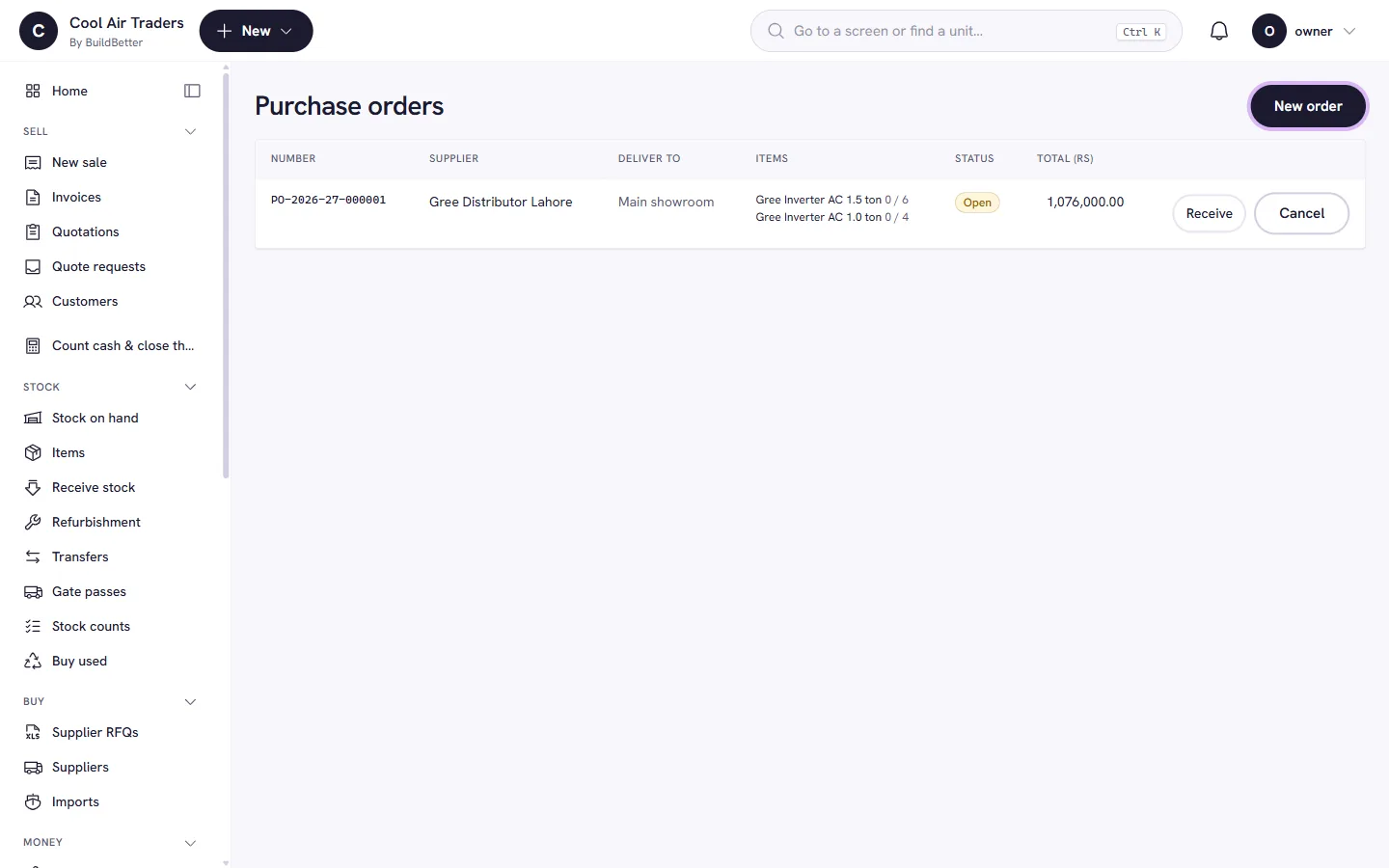
Buy and receive
Purchase orders turn into received stock without the storekeeper ever seeing a price. Every unit comes in with its own barcode.
- Purchase orders. Create, receive against, or cancel. The order price becomes the unit or batch cost when the receiver does not enter one.
- Goods received. Receive units or lots with server-issued barcodes, then print labels.
- Imports and landed cost. Shipments with customs duty, freight and clearing spread into the true cost of each item (add-on).
- Owed to suppliers. A payables view by supplier, so you know what is due before the call comes.
Step 2
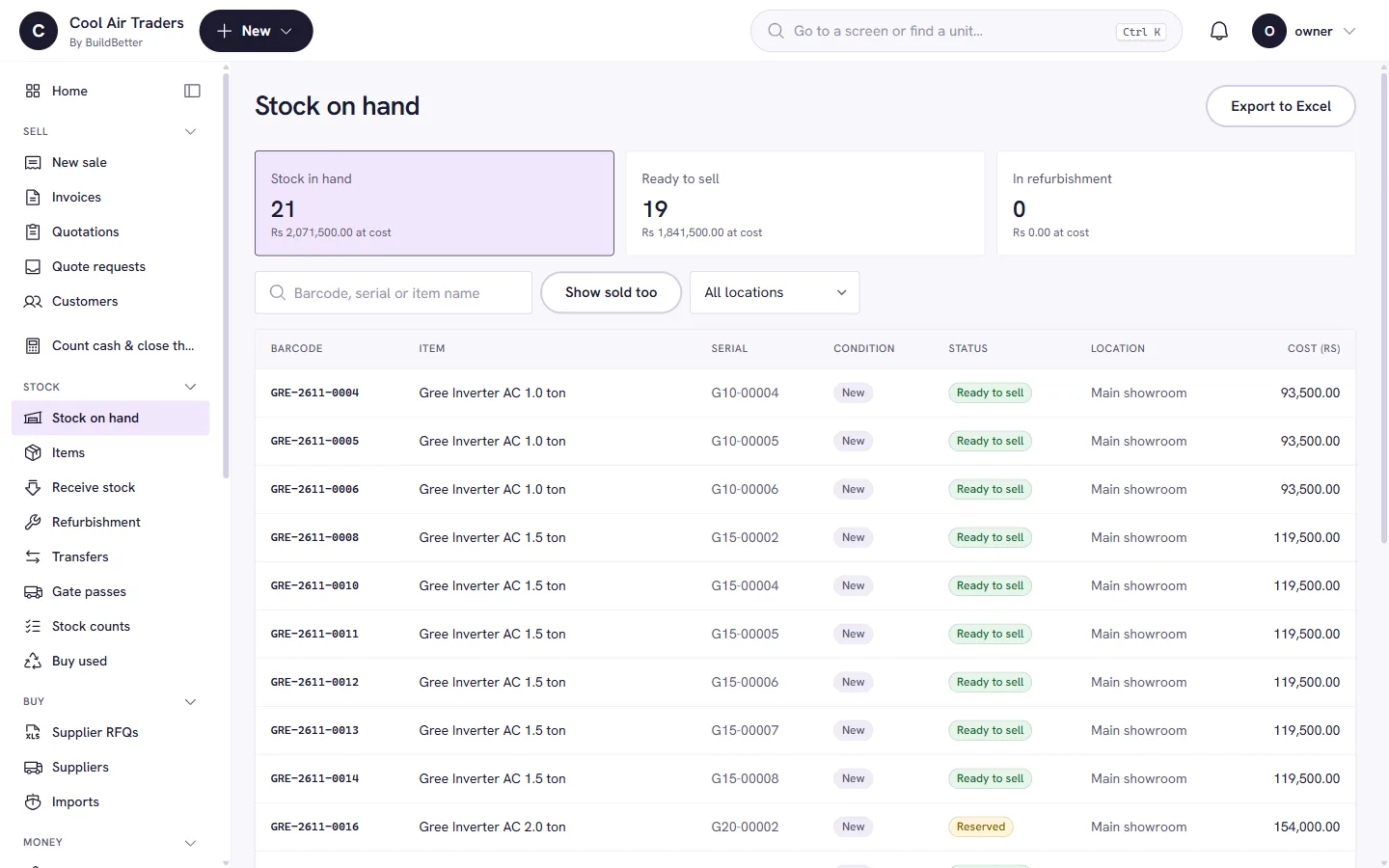
Track every unit
Each air conditioner, compressor or refrigerator has its own serial number and history, from the day it arrives to the day it is sold or claimed.
- Serial-tracked units. Each unit has a status (in stock, sold, in repair…) and a full movement history. Scan a barcode or serial and it opens.
- Sets that sell together. Group items that belong together, such as the two halves of a split unit, so they are sold, moved and warranted as one.
- Stock counts. Snapshot, scan, see the variance, then approve a write-off, relocation or adjustment. Nothing is changed silently.
- Costs stay private. Cost price is visible only to roles you allow. For everyone else it is absent from the screen, not blanked out.
Step 3
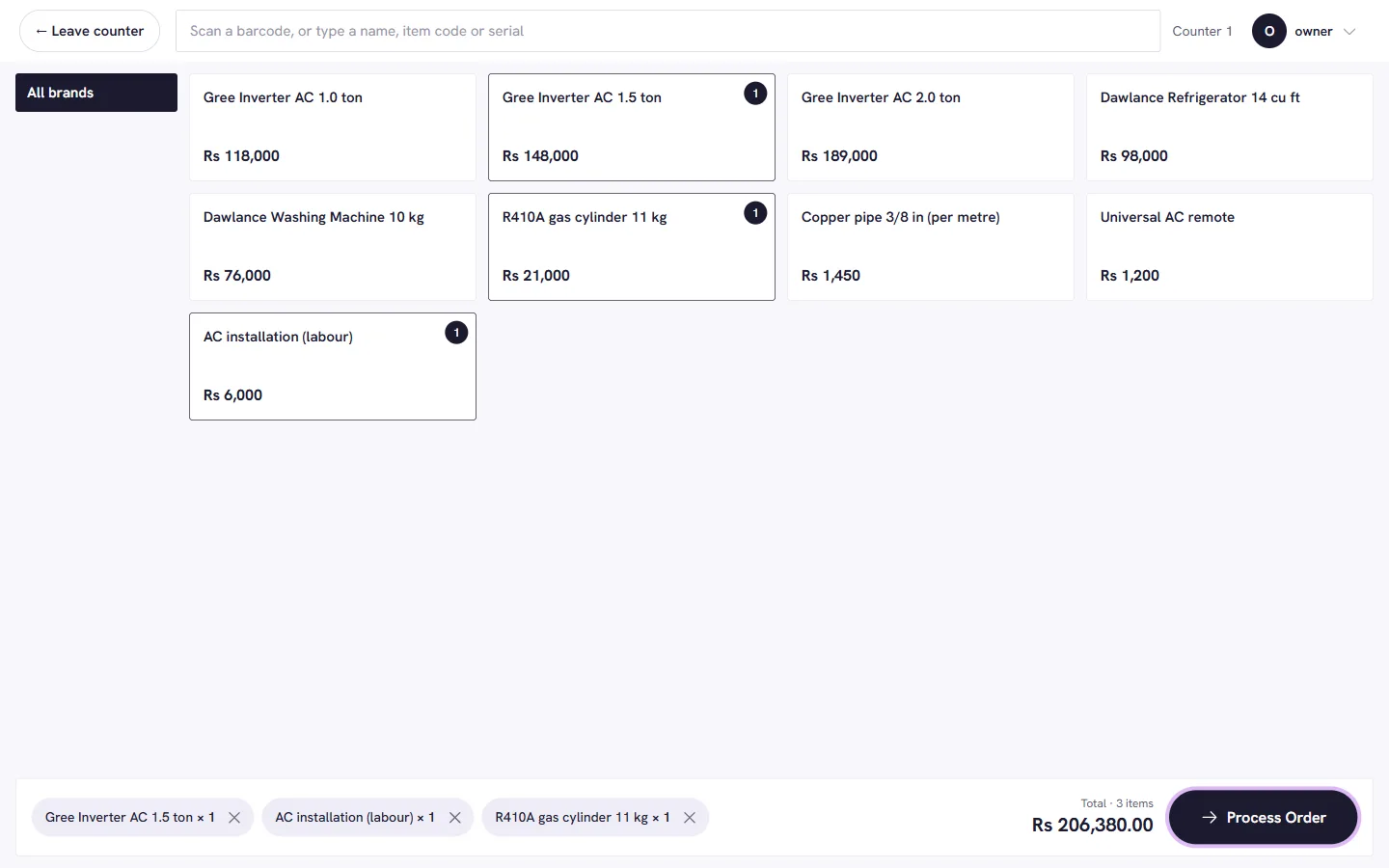
Quote and sell
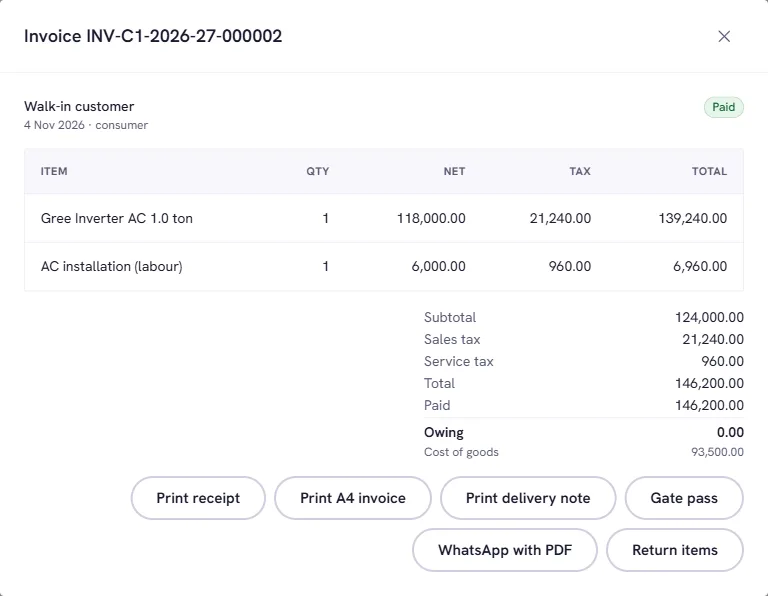
Customers ask for a price; you quote, they accept, and the quotation becomes an invoice with the same lines and the right tax. At the counter, scan or tap and take payment.
- Quotation to invoice. Accepted quotes convert, so nothing is typed twice and prices cannot drift.
- Tax done on the server. 18% sales tax, further tax by buyer type, withholding and provincial service tax on labour. A printed invoice always adds up to the paisa.
- Gapless invoice numbers. Numbers run in sequence per register and fiscal year (July to June). No gaps for an auditor to ask about.
- Payments your way. Cash, bank, wallet, post-dated cheques that clear or bounce, and instalment plans.
Step 4
Report to FBR
Every sale and credit note is queued for FBR reporting in the same step it is posted, so a document cannot exist without being reported.
- Queued with the sale. The reporting row is written in the same transaction as the invoice. Nothing depends on someone remembering.
- Never blocks the counter. If FBR is slow or down, sales carry on. The worker retries with growing waits.
- Checked before sending. A goods line with no HS code, or a registered buyer with no NTN, is stopped with a clear reason.
- QR on the receipt. Once accepted, the FBR number is on the receipt QR.
Step 5
Stand behind it
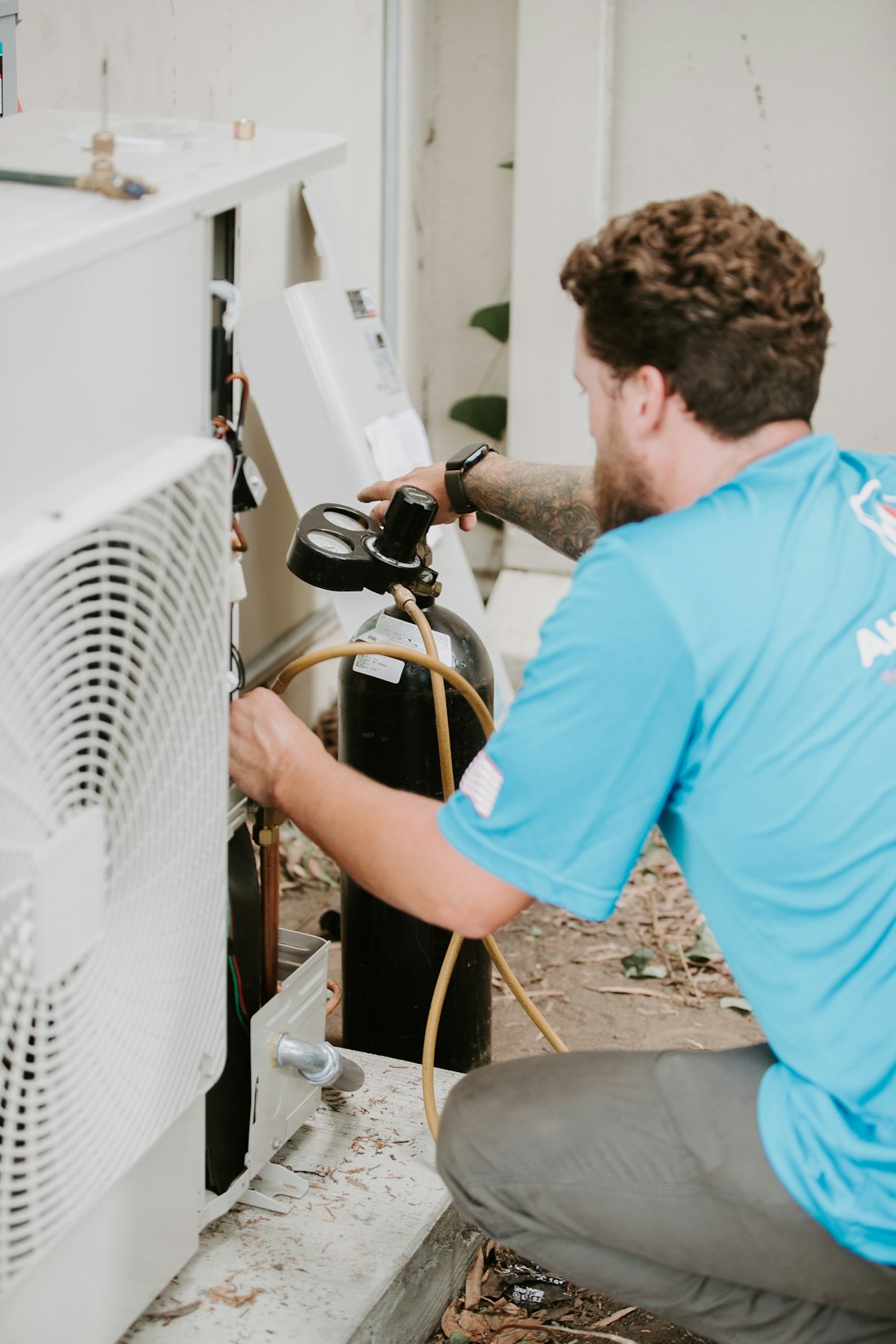
Each serial unit gets its own warranty when it is sold. Claims, repair jobs and annual maintenance contracts all run through the same invoice, tax and ledger as a sale.
- Warranty per unit. Parts and labour months come from the item; the clock starts on the sale. A return voids it and a resale starts a fresh one.
- Claims. Look up by serial and file a claim. It records what was covered on the day it was filed.
- Service jobs, billed properly. Completing a job issues parts from stock and raises an invoice with tax on labour.
- AMC contracts. Visits are spread across the year; completing one moves the next due date.
Step 6
Know your numbers
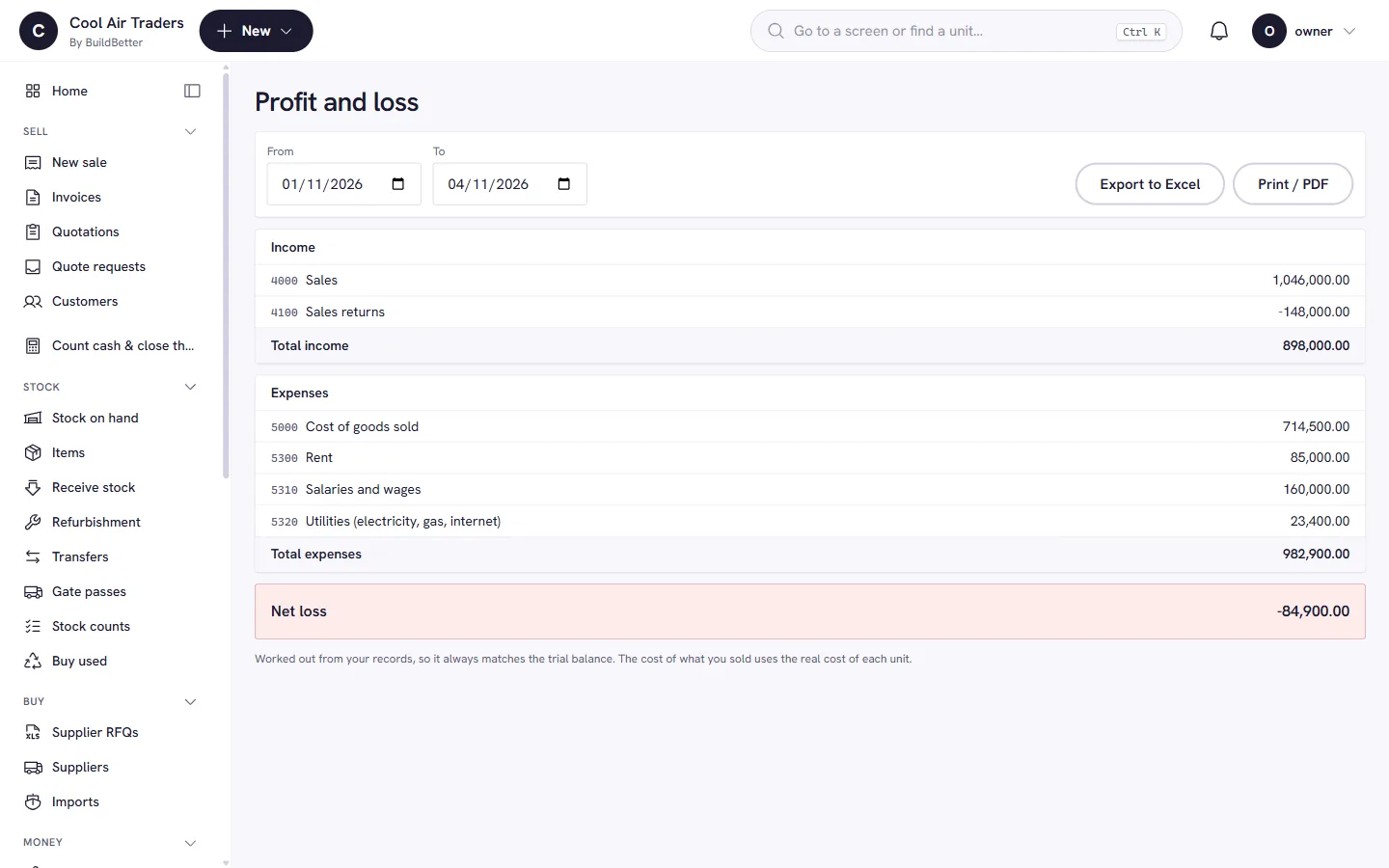
Every sale, receipt, return and purchase posts a double-entry journal, so the books are current without a month-end scramble. Sixteen reports answer the questions owners ask.
- Statements. Trial balance, profit and loss, balance sheet and cash flow.
- Bank reconciliation. Tick off bank and wallet statements against the books.
- Receivables and payables. Aging for what customers owe and what you owe.
- Stock value and dead stock. What your stock is worth today, how long it has sat, and which items barely move.


What an HVAC business needs, built in.
- Serial-tracked equipment
- Every unit has a status and history, from purchase to sale to warranty claim.
- Sets and loose items
- Sell an indoor and outdoor unit as one set, and gas, pipe and remotes as quantities.
- Installation and labour
- Bill labour with provincial service tax on the same invoice as the equipment.
- Warranty and AMC
- Claims, repair jobs and maintenance visits, billed and reminded.
- Credit and cheques
- Dealers and projects often pay by post-dated cheque or instalment. Both are tracked and reminded.
- Imports
- Landed cost across customs, freight and clearing, so your margin is real.
- Projects with withholding tax
- Track withholding certificates and retention on contractor jobs.
- Refrigerant and cold chain
- Refrigerant stock and cold-chain records are built in.
Try it
Run a sale before you book a demo.
A hands-on copy of the counter. Sell an air conditioner, watch the serial and the stock move, then go offline and keep selling.
- Charge a sale
- See the stock drop
- Open Home for the day
- Go offline and sell again
Cool Air Traders · demo company
Tap an item to add it
The parts you will use most.
- InventoryKnow which unit is where, and what it cost.
- Sales & POSA counter that is fast for the cashier and exact for the accountant.
- Warranty & AMCSelling a unit starts its warranty. Servicing it gets billed.
- FBR reportingA sale is never forgotten at filing time.
- AccountingBooks that balance because the database insists.
Where it runs
On the shop PC, in the browser, and soon on a phone.
- Available
Windows app
Runs on the shop PC and keeps selling when the internet drops, then uploads when the connection returns.
Learn more - Available
In the browser
The same system in any browser, with a home screen per role: cashier, storekeeper and owner each see what they need.
Learn more - Coming soon
Mobile app
Planned, not built yet. See what we have in mind.
Learn more
Coming next
Not in the box yet, and we say so.
Both are labelled as they are. Nothing here is sold as finished.
Next step
See it with your own stock list.
Book a short demo and we will set it up around the way you sell.